From a question to results
Follow a help-centre question through vectors, scores and a missed article.
Skeg 0.8 · Development documentation
Someone opens your help centre and asks, “How do I get back into my account?” You want to show articles about passwords and account access before an article about invoices. How does that question become a list of article IDs and scores?
This page follows that search. First we give the documents coordinates, then calculate their scores, and finally see how a fast search can miss a good answer.
1. Give the question and the articles a common representation
To compare sentences by vector similarity, your application first passes the article text and the question through an embedding model. The model returns a vector: an ordered list of numbers. The search then compares these vectors.
For this explanation we choose two coordinates by hand. They illustrate the calculation; they are not the output of an embedding model for these sentences. The letters identify articles in the diagram:
| Article | Label | Vector |
|---|---|---|
| Reset your password | A | (1, 0) |
| Download an invoice | B | (0, 1) |
| Recover account access | C | (0.8, 0.6) |
| The user’s question | (1, 0) |
All four vectors have length 1. For C, this follows from .
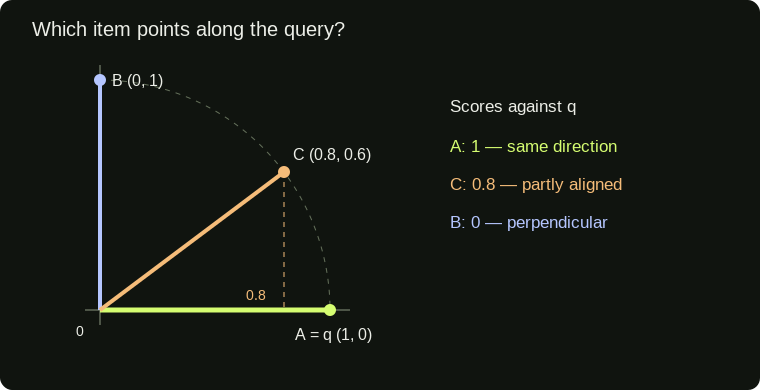
A lies exactly along the query. C points partly in that direction. B is perpendicular to it. The diagram therefore predicts the password article first, account access second and invoices third.
2. Turn the comparison into a score
For two nonzero vectors and , cosine similarity is their dot product divided by their lengths:
The dot product multiplies corresponding coordinates and adds them. The notation means the Euclidean length of . For our two-dimensional vectors:
The subscripts 1 and 2 identify the first and second coordinates. Dividing by the lengths removes their scale and compares their directions.
Since every length is 1, the score in this example is just the dot product.
| Item | Calculation against q = (1, 0) | Score |
|---|---|---|
| A | 1 × 1 + 0 × 0 | 1 |
| C | 0.8 × 1 + 0.6 × 0 | 0.8 |
| B | 0 × 1 + 1 × 0 | 0 |
If we request the two highest scores, the exact answer is A followed by C. The score 0.8 is a geometric similarity, not an 80% probability of relevance. Whether nearby vectors represent useful matches depends on the model and data. The zero vector has no direction, so cosine similarity is undefined for it.
3. Understand why a precisely scored result can still miss an article
With three articles, comparing every vector is easy. With a large archive, doing that for every question can take too much work. An approximate index looks for promising articles first. Those articles form the candidate list. Reranking calculates more precise scores for that list and puts it in order.
Consider two possible candidate sets for the same query:
| Candidates found | Scores after exact reranking | Returned top two |
|---|---|---|
| A, B, C | A: 1; C: 0.8; B: 0 | A, C |
| B, C | C: 0.8; B: 0 | C, B |
In the second case the password article A never enters the candidate list. Its score would have been the highest, but the reranking step never gets to calculate it. The user sees account access and invoices instead.
This is the limitation to remember when tuning a search: accurate scores for the articles found do not tell you whether a better article was missed.
4. Measure how many of the best articles were found
Recall answers that question. In the second search we wanted A and C, but recovered only C. We found one of the two desired articles, so recall@2 is , or 50%. Recovering both would give 100% for this query.
We can state that limitation with sets. Let be the complete dataset and the candidates found for query . The expression
means that every candidate belongs to the dataset. Let be the exact top two in the entire dataset, and the two highest-scoring members of the candidate set after reranking. In our example:
The intersection symbol selects items present in both sets; the bars count those items. The denominator is the two exact neighbours we wanted to recover.
With candidates , the intersection is , so recall@2 is . With candidates , it is , so recall@2 is . Here there are no tied scores and at least two candidates. A general evaluation must also specify tie handling, filters and what happens with fewer results.
5. Ask a different question
Now let . Calculate the dot products again: B scores 1, C scores 0.6, and A scores 0. The exact top two become B and C. The stored articles did not change; the query changed which direction matters. In an application, a different sentence produces its own query vector through the same embedding model used for the documents.
Use these ideas in a running server
Skeg’s disk search uses candidate search and reranking; see the architecture explanation. The number of requested results and the search effort are different controls. Choose search settings by measuring the recall and latency of representative queries.
Follow getting started to store these three articles and retrieve their titles. Then add a language or date filter, or learn how to choose search effort when a search is too slow or misses useful neighbours.